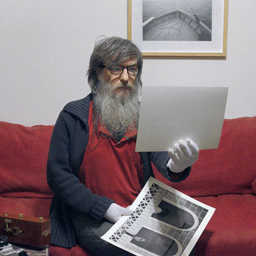
I'm asking the question about digital noise.
This example is a photograph taken at ISO 6400, with a Fujifilm X-Pro2 camera and a Leica-M 35mm Summicron Asph. lens.
Digital noise at this sensitivity is inevitably visible on any camera.
The question is: how visible is it in a print at a nominal magnification?
Specifically, a print from a 24 megapixel camera at 300 ppi, which equates to a size of approximately 34 x 51 cm (13.39 x 20.10 inches). Or any other camera with any nominal size.
Example #2 is a 100% crop of the nominal print size, 34 x 51 cm (13.39 x 20.10 inches). Both luminance and chrominance noise are evident.
But from my point of view, in this print size, it is not dramatic.
But I'm not sure that the noise we see on a monitor is the same as what we would see in a photographic print. It's more likely that in a print, this noise is somewhat attenuated, or perhaps attenuated enough, to the point of seeing some grain, but not all of this luminance and chrominance noise.
I don't even think you can see only luminance grain, which is more similar to film grain.
But I also think that chrominance noise, that is, colored noise, is not as evident as on a monitor, thus making the print very acceptable, and perhaps even pleasant, like a high-sensitivity analog print.
This thesis is, from my point of view, and for how I understand photography, absolutely valid at lower sensitivities. Sensitivities are always higher than the camera's nominal sensitivity, but perhaps not as high as ISO 6400.
So, how much further can you push the sensitivity while still obtaining a pleasing, grainy print similar to high-sensitivity analog photography, without necessarily incurring intrusive and unpleasant noise?
Why would you print a noisy photo when today's software is capable of perfectly cleaning it up, even preserving or recreating detail?
If we're talking about art, not commercial photography, or if we're talking about amateur rather than professional photography, even if we're simply talking about interpretation, it's because otherwise photographs would all be structurally the same; a daytime photograph at ISO 100 is the same as a nighttime photograph at ISO 6400. This didn't happen in analog photography, de gustibus.
This is photography today, software-assisted, with cutting-edge technology. But we shouldn't forget that for the camera sensor, however modern, noise is physiological—can we say physiological? Let's face it. It is just as physiological as it is for analog photography.
As the 100% crop in example #3 shows
Perhaps part of the problem is monitor viewing. I'd be inclined to believe that if digital photography didn't go through the monitor, but directly to print, photographers wouldn't make such a big deal out of it.
At least up to the nominal print magnification. For higher magnifications, as you can see from this example, the situation would be different.
This doesn't mean that digital noise isn't a problem. In some respects, or in some cases, film grain was too.
It simply means that perhaps it's better to evaluate digital noise more carefully, and with less prejudice, transforming it into an interpretative opportunity, where the defect, at times, is an added value, which can give the image a more romantic and analog look.
For those amateur photographers who like this concept, I'd recommend starting by trying to eliminate only chrominance noise, thus achieving a nice grainy, analog look. Try it and see how beautiful it is.
Because, let's face it, unfortunately, digital noise is different from film grain; it's certainly more unpleasant, but it remains intrinsic. An interesting aspect is that you can work on luminance or chrominance noise without distinction.
Precisely because it's unpleasant, in many cases, noise reduction is necessary. And we who use Color Perfect must find the best way, the method, to eliminate digital noise from our images.
This discussion isn't meant to be a noise-positive versus noise-negative debate. We're all aware, for example, that a nighttime cityscape can look unsightly at ISO 6400. But it also depends on the intended use. And in any case, many other photographs may not have the same unsightly problem.
So, if we want, or need, to eliminate digital noise, I'd say there are two methods:
The first is to plane it after finishing the processing with Color Perfect, so once the work is finished. And there are many software programs for doing this.
The second is to plane it before using MakeTiff, that is, first run it through a software that cleans it up and returns a linear DNG file to then pass through MakeTiff.
Here, however, it seems to me that not all software is suitable, because the conditions are to have a linear DNG file returned.
I don't know which method is best.
I'd assume the second one.
Since I don't have software that can output linear DNG, I was only able to experiment with the first method—cleaning it up after the job was completed—and I have to say it can be done; I'm happy with the result.
This is coming from someone who also likes digital noise, as long as it's not too excessive! So the discussion is open.
The 100% crop in example #4 shows the file first processed with Color Perfect, and then planed of chroma noise only.
The 100% crop in example #5 shows the file first processed with Color perfect, and then planed for luminance and chrominance.
Examples 6 and 7 show the same processing as the respective examples 4 and 5, but with a crop to the nominal print size. That's the maximum enlargement, of maximum quality, that you would get at 300 ppi with the camera in question.
It should be noted that in examples 4, 5, 6, and 7, digital noise reduction was performed using Dfine2 from the first version of Nik Collection, which now uses outdated technology. Therefore, these are not intended to be optimal examples, but rather conceptual examples.
In any case, leaving aside the fact that my noise reduction is poor, and that current software can achieve miraculous results, my favorite images are 2 and 6. While 2 probably still shows some chrominance noise during printing, but perhaps you should look for it with a magnifying glass; at the very least, it should be much less noticeable, and therefore, perhaps still pleasing. And 6, in my opinion, is spectacular with this "dirty" and grainy effect that reminds us of analog photography.
So the message is: if we use high sensitivity in our digital cameras, then let's show it off, at least when it's worth it. After all, that's what Color Perfect users do when scanning or reproducing from negatives. For all other cases, personally, I'm looking for the best and most natural method for noise reduction.
As I said, I assume the best solution would be to reduce the noise before processing with Color Perfect, but I don't have any examples to show, and I don't know if this is actually the case.
If anyone has done any tests on this and knows the best solution and method, it would be helpful and interesting to know.
All examples have been sharpened using a sharpening mask (not Nik Collection Sharpener Pro 3) to show a roughly complete result.